Understand BMAD v6
Four standard phases plus flexible org extensions for a full DevOps loop.
Enterprise modernization · Azure Government · 3 live sessions
Press → or Space for the full deck (all sections + appendix)
Full route — BMAD method, Referral POC, ACA operations, and token economics.
Four standard phases plus flexible org extensions for a full DevOps loop.
Planning artifacts → implementation readiness → story cycle.
Prompt less, document more, fresh chat per workflow.
DAPR, Service Bus, Bicep, revisions vs AKS operational burden.
Full narrative — method, greenfield, POC, ACA ops, token ROI.
Platform decision and day-2 operations for .NET on Azure Container Apps — without standing up AKS.
Use the decision matrix, POC topology, and docs/ACA-vs-AKS.md.
Overview, environment, Dapr components, revisions, log stream.
Native sidecar, Service Bus publish, no cluster add-ons.
Traffic weights, revision lifecycle, CLI demo on Referral Service.
In a typical 5-developer team running ad-hoc IDE prompts, an industry-anchored model places quarterly rework around ~$48K — plus production incidents and a paper trail nobody can defend in a compliance review. Illustrative · calibrate to your team via the live calculator (slide 34).
Executive takeaway: AI productivity is real, but ad-hoc prompting burns the gains on rework. BMAD captures the gains by putting small artifacts in git — governable, repeatable, auditable.
Same team, same scope, six sprints. Ad-hoc wins the first 12 minutes; BMAD wins the quarter. Illustrative numbers from a published team study · your numbers will vary.
12 → 28
Features shipped
+133% throughput
47 → 9
Production bugs
−81% defects
2 → 0
Major rewrites
No architectural drift
−260 min
Saved per feature
vs ad-hoc rework loop
| Task size | Ad-hoc (incl. rework) | BMAD | Winner |
|---|---|---|---|
| Small (config tweak · UI label) | 12 min | 5.5 hr | Ad-hoc |
| Medium (new endpoint + Angular form) | 8 hr | 6 hr | BMAD (−25%) |
| Complex (Oracle proc + service + UI) | 20 hr | 8 hr | BMAD (−60%) |
Anchored to a public 6-month team study (June 2026) · treat as order of magnitude, not a guarantee · calibrate via the Cost Calculator (slide 34)
Token spend goes up with BMAD. Total delivery cost goes down by ~60% — because rework and incidents drop faster than tokens rise. Illustrative model · not measured numbers · calibrate to your team via slide 34.
| Cost line | Ad-hoc | BMAD greenfield | BMAD brownfield |
|---|---|---|---|
| API tokens | ~$2.4K | ~$12K | ~$18K |
| Bug-fix rework | ~$48K | ~$10K | ~$5K |
| Rewrites | ~$8K | $0 | $0 |
| Production incidents | ~$18K | ~$3K | ~$1.5K |
| Onboarding | ~$4K | ~$1K | ~$1K |
| Setup overhead | $0 | ~$4K | ~$8K |
| Total (rounded) | ~$80K | ~$30K | ~$33K |
| Payback sprint | — | ~Sprint 2 | ~Sprint 1 |
BMAD is overhead until it isn’t. The break-even point is structural: size of the work, blast radius, and downstream risk.
Heuristic: if the work survives one sprint or touches code anyone else will read, BMAD pays back. If it’s a throwaway or a 3-file hotfix with green tests, ad-hoc wins.
BMAD — Breakthrough Method of Agile AI-Driven Development. A modular framework for production-grade software through structured human + specialized AI agent collaboration.
Universal collaboration engine — human–AI interaction foundation.
Software workflows — PRD, architecture, epics, sprint cycle.
Custom agents, workflows, and domain modules for your stack.
BMAD v6 is not more prompts — it is a repeatable operating model for AI-native software delivery.
AI-powered agile framework — specialized agents, scale-adaptive tracks, four-phase lifecycle.
Structured workflows with specialized agents — not one chat for everything.
Planning depth matches project complexity.
19+ agents — PM, Architect, Developer, UX, Analyst, QA, and more.
Mary — brainstorm, research, product brief. Skip for brownfield / Quick Flow.
John (PM) — PRD, requirements, stories. Sally (UX) — design spec when UI is in scope.
Winston — stack, patterns, architecture. Epics + IR gate before sprint.
Amelia + Quinn + Bob — story loop to working code and reviewed stories.
Edit slide HTML or diagrams/bmad-framework-overview.svg for the printable one-pager.
Progressive context engineering — each phase produces artifacts that inform the next.

Edit: training/deck/diagrams/bmad-four-phases.svg
BMAD ships four standard phases. Your team adds extension phases (Deploy, Operate, Compliance, …) using the same story cycle — no fork of the methodology.

Add org workflow skills (no BMAD core fork): (1) copy a workflow folder e.g. bmad-dev-story → bmad-deploy-verify under .agents/skills/ + .claude/skills/ · (2) team overrides in _bmad/custom/*.toml · (3) register menu code on an agent e.g. Amelia DV · (4) optional bmad-customize to author overrides.
Planning depth matches complexity — pick Quick Flow, Method, or Enterprise; L0–L4 routes how much Phase 1–3 you run.
quick-spec → dev-story → code-review
Full lifecycle — PRD, architecture, epics, story loop
Referral ACA POC uses this track
Brownfield: backfill artifacts, then increment
Full governance suite · deep architecture · NFR gates
| Level | Scope | Typical effort | Track / phases |
|---|---|---|---|
| L0 | Atomic change | 30 min – 2 hr | Quick Flow — skip Phases 1–3 |
| L1 | Small feature (1 epic) | 4 – 8 hr | Quick or Method — minimal PRD |
| L2 | Feature set | 1 – 2 wk | Method — PRD + selective solutioning |
| L3 | Project | 2 – 6 wk | Method — full Phase 3 + IR gate |
| L4 | Enterprise | 2 – 6 mo | Enterprise — governance, TEA, traceability |
Make the decision once at the policy level instead of relitigating per ticket.
| Project type | Recommendation | Rationale |
|---|---|---|
| Multi-sprint greenfield | Full BMAD (8-step Method track) | ROI positive by sprint 2 |
| Multi-sprint brownfield | BMAD brownfield (GPC + DP first) | ROI positive by sprint 1 |
| Small feature on existing project | BMAD Quick Flow | Right-sized · lean path: GPC → DP → PRD → CA → IR → QQ → CR |
| Isolated hotfix, full test coverage | Ad-hoc prompting | BMAD overhead not justified |
| Prototype / throwaway | Ad-hoc prompting | Speed more valuable than structure |
Decide at policy level, not per ticketMixed teams: Quick Flow is the safe default for ambiguous work
Click any step for commands · dashed column = org Deploy & Release (DV / bmad-deploy-verify) · ? brownfield · i catalog
Same Method track, different entry point and different risk posture. Pick by where the code is today, not what feels new.
| Dimension | Greenfield | Brownfield |
|---|---|---|
| Starting point | Blank slate | Existing code — AI must learn it first |
| First mandatory step | Market analysis + PRD | /bmad-generate-project-context (GPC) → project-context.md |
| Planning scope | Full system design | /bmad-prd right-sizes scope (story · epic · full) |
| QA role | Test strategy for new features | Mandatory IR before code · CR + QA after dev |
| Story format | Standard epic → story chain | Brownfield stories with rollback plan |
| Biggest risk | Architectural drift across sessions | Silent regression if setup skipped |
| Setup overhead | 2–6 hr | 4–12 hr per feature area |
| API cost / dev / mo | $800–$2,000 | $1,200–$3,200 |
| Payback sprint | Sprint 2 | Sprint 1 |
Bug reduction: 80% GF · 90% BFIncident reduction: 85% GF · 92% BF
Same 8 steps, two entry points. Red badges in brownfield = mandatory — skip and the rest guesses about your codebase.
/bmad-generate-project-context (GPC) → lean project-context.md for LLM agents/bmad-document-project (DP) — maps existing patterns, dependencies, tech debt/bmad-prd (PRD) — story (<4 hrs) / epic / full PRD; handles all scopes/bmad-create-architecture (CA) — integration adapters that respect existing patterns/bmad-check-implementation-readiness (IR) — alignment check before any code/bmad-dev-story (DS) or /bmad-quick-dev (QQ) — smallest change that achieves the goal/bmad-code-review (CR) — adversarial review, NFRs, regression risks/bmad-qa-generate-e2e-tests (QA) — automated API/E2E tests for implemented codeGitHub issues #446 / #563 trace nearly all brownfield friction to one anti-pattern: developers jump to story implementation and skip steps 1–2. Always run GPC + document-project first. Lean path: GPC → DP → PRD → CA → IR → QQ/DS → CR.
| # | Step | Slash skill | Why it matters |
|---|---|---|---|
| M1 | Generate project context | /bmad-generate-project-context (GPC) | Lean project-context.md — replaces deprecated npx flatten |
| M2 | Document project | /bmad-document-project (DP) | Maps existing patterns, dependencies, tech debt |
| 3 | PRD | /bmad-prd (PRD) | Right-sizes scope — story · epic · full (no separate classify skill) |
| 4 | Architecture | /bmad-create-architecture (CA) | Integration adapters that respect existing patterns |
| 5 M3 | Implementation readiness | /bmad-check-implementation-readiness (IR) | Alignment gate before code — replaces standalone risk step |
| 6 | Dev | /bmad-dev-story (DS) or /bmad-quick-dev (QQ) | Minimal footprint; QQ for small changes |
| 7 | Code review | /bmad-code-review (CR) | Adversarial review, NFR validation |
| 8 | QA automation | /bmad-qa-generate-e2e-tests (QA) | Automated regression tests — pairs with CR |
Setup: 4–12 hr per feature areaPayback: Sprint 1Source: DeepWiki + GitHub working-in-the-brownfield.md
| Phase | Agents | Key artifacts | Invoke (IDE) |
|---|---|---|---|
| 1 · Analysisoptional | Analyst | Project brief, research | bmad-help bmad-brainstorming bmad-domain-research |
| 2 · Planning | PM, UX | PRD, UX spec | bmad-create-prd bmad-create-ux-design |
| 3 · Solutioning | Architect, PO | Architecture, epics, IR report | bmad-create-architecture bmad-check-implementation-readiness |
| 4 · Implementation | SM, Dev, QA | Stories, working code | bmad-sprint-planning bmad-dev-story bmad-code-review |
| Ext · Deployorg | Dev (Amelia) | Deploy stories, evidence pack | CS → VS → DV bmad-deploy-verify → CR |
| Ext · Operateorg | Dev, QA, SRE | Runbooks, probe/alert stories | DS → CR → ER |
| Ext · Your phasesorg | As needed | Custom epics in epics.md |
bmad-customize optional |
You do not “order code from a vending machine.” You guide specialized agents through gated workflows — BMad-Master for general tasks, not story implementation.
Analysis & requirements — brief, PRD, user stories
Solutioning — stack, patterns, readiness gate, UX spec
Story loop — CS → VS → DS → CR → ER
BMad-MasterParty ModeAdversarial code reviewAgent-as-Code
Six named BMM agents ship in this repo (_bmad/config.toml). Story-loop and Quick Flow personas appear in training and party mode.
| Name | Role | Phase | Invoke / greet | |
|---|---|---|---|---|
| 🎯 | BMad-Master | Universal agent | Anytime | Any task except story implementation |
| 📊 | Mary | Business Analyst | 1 · Analysis | Hey Mary BP MR DR CB DP |
| 📚 | Paige | Technical Writer | Analysis / docs | WD MG VD EC |
| 📋 | John | Product Manager | 2 · Planning | Hey John PRD CE IR CC |
| 🎨 | Sally | UX Designer | 2 · Planning | CU |
| 🏗️ | Winston | System Architect | 3 · Solutioning | Hey Winston CA IR |
| 💻 | Amelia | Senior Engineer | 4 · Impl + Deploy | DS DV CR CS SP QQ |
| 📌 | Bob | Scrum Master | 4 · Story loop | SP CS VS SS ER |
| 🔍 | Quinn | QA / Test Architect | 4 · Quality | QA quality gates CR support |
| ⚡ | Barry | Quick Flow solo dev | L0–L1anytime | QQ quick-spec → dev → review |
Set up BMAD in your IDE, run the agent commands, and walk through a live story cycle — from install to deployable code.
Works with Cursor, Claude Code, and VS Code + GitHub Copilot
Prerequisites: Node.js 20+, npm 9+, Git · AI IDE (Cursor, Windsurf, or Claude Code) · VS Code + Copilot optional
npx bmad-method install \
  --modules bmm \
  --tools cursor,claude-code,github-copilot \
  --yes
Start every session with bmad-help — routes from bmad-help.csv + artifacts in _bmad-output/.
BMAD bundles in ChatGPT, Claude, or Gemini for PRD/brainstorming — bring artifacts into the IDE for implementation.
docs.bmad-method.orggithub.com/bmad-code-org/BMAD-METHODbmadmethodguide.com
Same _bmad/ + _bmad-output/ — artifacts are IDE-agnostic; skills install per editor.
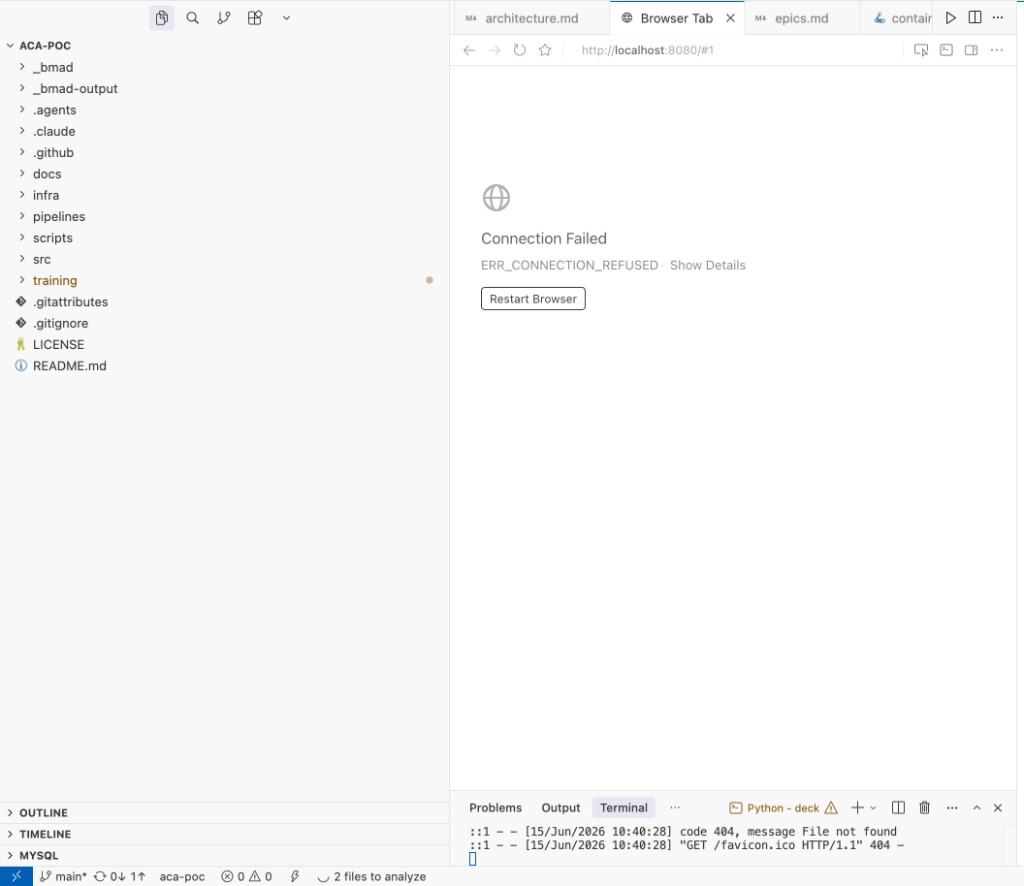
.agents/skills/bmad-*
Try: bmad-help
.claude/skills/bmad-*
Try: bmad-help
.agents/skills/bmad-*
Try: bmad-help
Agents follow _bmad-output/ in order. Each box is a file the next workflow loads — not a re-paste of README + architecture every chat.
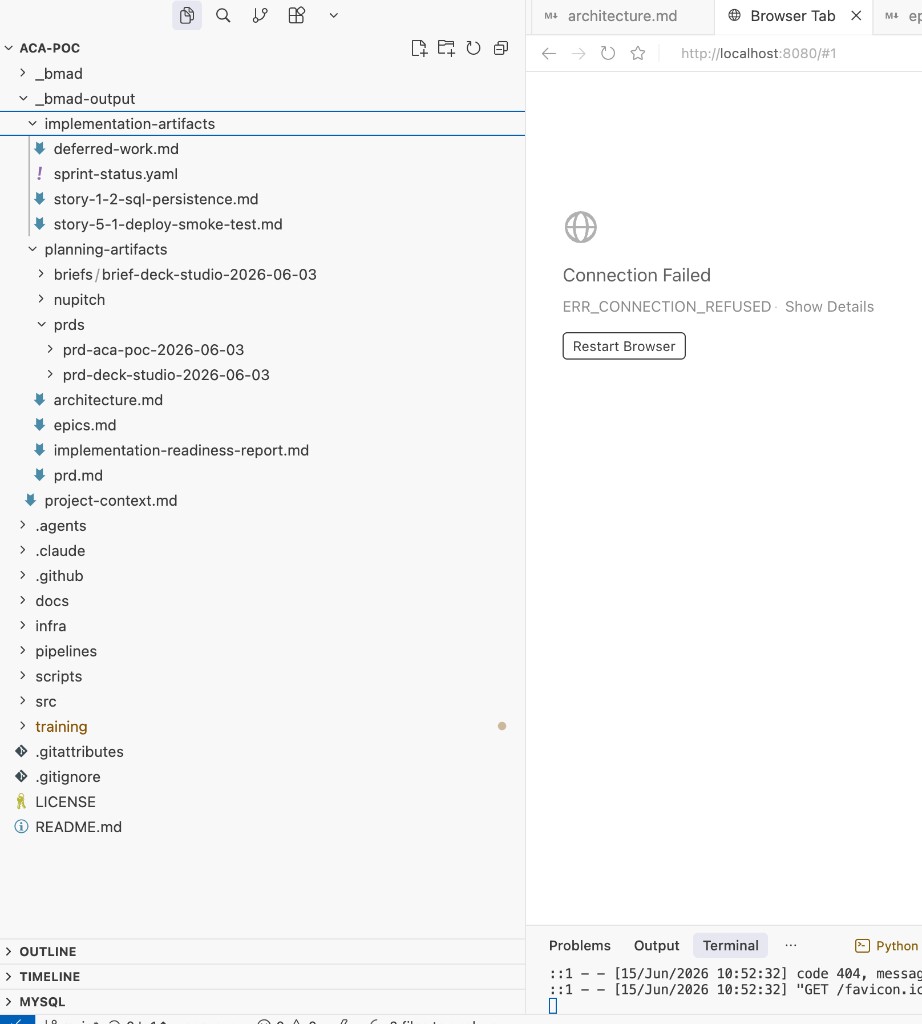
_bmad-output/ in aca-poc — real PRD, architecture, and story files
Load order — edit: training/deck/diagrams/artifact-chain.svg
Which command creates which file?
project-context.md
planning-artifacts/prd.md
planning-artifacts/architecture.md
planning-artifacts/epics.md
planning-artifacts/implementation-readiness-report.md
implementation-artifacts/sprint-status.yaml
story-1.2-*.md + code
Adopt BMAD in three stages — one project per stage. Each stage produces artifacts the next stage builds on.
1 team, 1 sprint, 1 epic — prove the artifact chain works.
Goal: working story cycle committed to git
3+ teams adopt the same artifact patterns. Onboarding doc-driven.
Goal: policy for when to use BMAD (Tiered Policy slide)
BMAD becomes the default for greenfield + brownfield. Retros feed the next sprint.
Goal: audit-ready by default
| Pre-seeded (show) | Live each cohort (fresh chat) |
|---|---|
| PRD, architecture, epics, IR | bmad-help |
| POC code & Bicep walkthrough | Sprint Status (SS) |
| Artifact chain tour | Code Review (CR) on Story 1.2 |
| — | Apply 1–3 patches + Retrospective (ER) |
Do not live-run Create PRD — high token cost, low repeatability.
Every story flows through the same four-step loop — scoped, implemented, reviewed, retrospected. Same shape on greenfield and brownfield.
~3-4 hours per typical storyAll artifacts committed to gitFailures loop back to Step 2
Two git layers architects can review: _bmad/ (platform config from install) and _bmad-output/ (delivery artifacts from workflows).
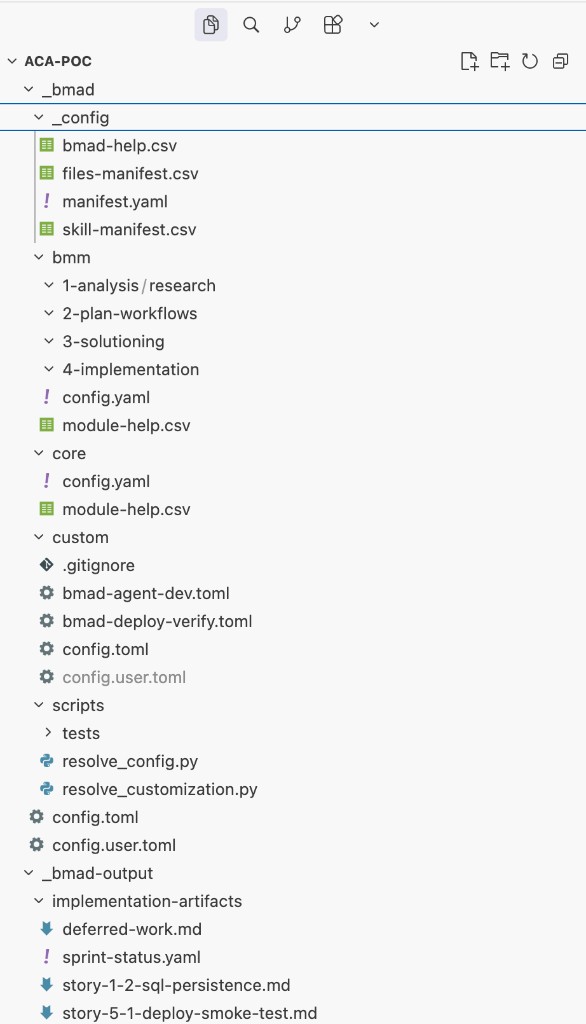
npx bmad-method install creates _bmad/; no workflow commands yet_bmad/ — platform & governance config in git_bmad/_config/ — manifest.yaml, bmad-help.csv, skill manifests_bmad/bmm/ — phase workflows (analysis → implementation)_bmad/custom/ — org extensions (e.g. deploy-verify TOML)Peer-review like IaC — diff on every PR; no chat log required
_bmad-output/ — delivery artifacts (slide 24 commands)planning-artifacts/ — PRD, architecture, epics, IR readiness reportimplementation-artifacts/ — sprint-status.yaml, story files, CR trailEach menu code commits its output — PRD → architecture → IR gate → story → CR
Process controls: fresh chat per workflow · IR gate before sprint · adversarial CR · human sign-off at phase boundaries
Traceability: architecture decisions link PRD requirement → story acceptance criterion → git diff
A platform proof for enterprise modernization on Azure Government — not full program delivery.
Scope focus: Presentation stays on Angular / COMPASS; SOA Policy Manager unchanged — POC deep-dives Referral API compute and data path.
| Domain | Direction for this POC |
|---|---|
| Presentation |
 Angular via COMPASS — reuse shared UI components |
| API edge |

 SOA Policy Manager — JWT, rate limit, OpenAPI (unchanged) |
| Compute |

 Referral Service on ACA — .NET 10 modular APIs |
| Runtime |
 DAPR — notifications, shared logging cross-cutting |
| Data |


 Azure SQL (EF Core), Redis cache — reuse established estate patterns where possible |
| Messaging |

 Azure Service Bus (target); MSMQ adapter interim where required |
| Security / ops |


 Front Door + WAF, Key Vault + MI, App Insights — GovCloud gaps noted |
| IaC / CI |

 Bicep modules, Azure DevSecOps patterns — partial in POC |
Goal: Modular container POC for Azure Government modernization programs
Stack: .NET 10, DAPR, Service Bus, EF Core, SQL, Bicep, ACA revisions
Question answered: ACA vs AKS for .NET microservices with DAPR already committed
BMAD role: Brownfield backfill; Story 1.2 SQL persistence via story cycle

Repo paths: src/ReferralService · infra/main.bicep · _bmad-output/
| Dimension | Azure Container Apps | AKS |
|---|---|---|
| DAPR | ✓ Built-in, one flag | Helm chart lifecycle |
| Service Bus scaling | ✓ Native KEDA rule in Bicep | Install / configure KEDA |
| Blue/green | ✓ Revisions + traffic split | Argo / Flagger / mesh |
| Operations | ✓ No node pools | Cluster + add-on ops |
| When AKS wins | Start on ACA first | GPU pools · strict CNI / Calico policy · advanced mesh |
Use the live Portal and this repo to explain revisions, DAPR, and blue/green — without standing up AKS.
Audience: architects & engineers evaluating ACA for enterprise .NET workloads · Duration: ~60 min hands-on demo or Session 2 supplement
The Overview page is the map of one Container App — not the whole environment.
| Essentials field | What it means for teaching |
|---|---|
| Application Url | External ingress FQDN — hit /health/live and /health/ready in the demo |
| Environment | Shared ACA environment — DAPR components and networking live here (click through) |
| Provisioning state | Resource healthy vs Azure still applying Bicep/ARM changes |
| Revision (running) | Current image + config snapshot receiving traffic — e.g. referral-svc-dev--0000006 |
| Revisions with issues | Failed deploy attempts — image pull, probe failure, bad env — still listed until deactivated |
| Tags | Cost / ownership — tie to Bicep tags in infra/main.bicep |
Portal → Container Apps → your app → OverviewContrast with Environment overview (shared plane)
1. Container App — your .NET container + optional DAPR sidecar (one revision = one deploy unit)
2. ACA Environment — shared runtime; DAPR components (Service Bus pub/sub) attach here
3. Azure services — Service Bus, SQL, Key Vault, ACR, App Insights — wired via Bicep + MI
Walk left-to-right: ingress → app → DAPR sidecar → Service Bus · SQL via MI · secrets from Key Vault
On AKS you think Pods and Deployments; on ACA you think revisions and traffic weights.
az containerapp update or new imageactiveRevisionsMode: Multiple enables traffic splitTeaching line: No cluster objects to explain — revisions + weights replace Deployments + progressive delivery tooling.
| Location | Portal path | Repo path |
|---|---|---|
| 1. App DAPR settings | Container App → Settings → Dapr — enable sidecar, appId, port | infra/modules/containerapp.bicep — dapr.enabled, appId must match component scope |
| 2. DAPR components | ACA Environment → Dapr components — pub/sub, state, bindings | infra/modules/dapr-component.bicep — pubsub-servicebus → Service Bus |
| 3. Application code | Not in Portal — uses DAPR HTTP/gRPC on sidecar | src/ReferralService/Program.cs — publish via DAPR client after POST /referrals |
Common lab error: sidecar log pubsub pubsub-servicebus is not found → appId mismatch or component not on environment.
Five steps — revision traffic weights replace progressive delivery tooling.
--0000006)| ACA | AKS equivalent (for contrast) |
|---|---|
| Revision + traffic % | Second Deployment + Service weights or Flagger |
| Built into platform | Install/configure progressive delivery tooling |
Bicep: activeRevisionsMode | Helm values + ingress controller rules |
# List revisions and traffic
az containerapp revision list -n referral-svc-dev -g rg-referral-poc-centralus \
  -o table

# Deploy green (new image) — creates new revision
az containerapp update -n referral-svc-dev -g rg-referral-poc-centralus \
  --image <acr>.azurecr.io/referral-svc:<new-tag>

# Split traffic 90/10 then 100/0
az containerapp ingress traffic set -n referral-svc-dev -g rg-referral-poc-centralus \
  --revision-weight referral-svc-dev--0000006=90 referral-svc-dev--0000007=10

az containerapp ingress traffic set -n referral-svc-dev -g rg-referral-poc-centralus \
  --revision-weight referral-svc-dev--0000007=100

# Deactivate old revision
az containerapp revision deactivate -n referral-svc-dev -g rg-referral-poc-centralus \
  --revision referral-svc-dev--0000006
Run after health probes pass on greenReplace names with your RG and revision IDs
| Segment | Time | Do this |
|---|---|---|
| 1 · Why ACA | 10 min | POC slides ACA vs AKS + docs/ACA-vs-AKS.md — DAPR, KEDA, revisions |
| 2 · Repo walk | 15 min | infra/main.bicep → modules → Program.cs health + DAPR publish |
| 3 · Portal | 15 min | Overview → Environment → Dapr components → Revisions → Log stream |
| 4 · Live API | 10 min | /health/live, /health/ready, POST /referrals (Service Bus) |
| 5 · Blue/green | 10 min | Revision list → traffic split CLI → deactivate old revision |
Maps to Session 2 in docs/bmad-facilitator-runbook.md and POC deck slides (topology, decision matrix).
Facilitator crib sheet — environment-level DAPR is the #1 concept trainees miss.
| When trainees ask… | ACA answer | AKS note (honest) |
|---|---|---|
| “Where is DAPR?” | Toggle + component in Bicep; sidecar injected | Helm chart, upgrades, node compatibility |
| “How do we scale on queue depth?” | KEDA rule on Service Bus (Bicep) | Install KEDA, CRDs, scrape config |
| “How do we do blue/green?” | Revisions + traffic weights (ACA ops section) | Flagger/Argo or duplicate Deployments |
| “What about GovCloud?” | Same ACA model; this POC targets Azure Government | AKS also in Gov; more ops surface |
| “When must we use AKS?” | GPU workloads, strict CNI policy, service mesh at scale — see full matrix in docs/ACA-vs-AKS.md | |
| Check | Action |
|---|---|
| Health endpoints | GET /health/live and /health/ready return 200 before demo |
| DAPR publish | Verify appId = component scope; environment has pubsub-servicebus |
| SQL persistence | Run scripts/grant-sql-mi-access.sql in Portal Query Editor; redeploy restores KV secret |
| Failed revisions | Deactivate old failures so Overview is clean |
| Commercial vs Gov | No Gov sub? Deploy to commercial (e.g. centralus) — same Portal UX |
| KEDA scale rule | May be commented in Bicep until API accepts MI on custom scale rule — mention as roadmap |
./scripts/deploy.shEvidence pack § deploytraining tag for clean story branch
Short answer: BMAD costs less for real delivery. The myth compares one chat to one workflow — the right metric is monthly spend + rework.
For executives: the proof is in the 5-Dev Team ROI table and the live Cost Calculator later in this section · Charts: training/deck/diagrams/token-*.svg (editable)
Myth: one BMAD workflow costs more tokens than one prompt. Reality: measure monthly delivery — ad-hoc loses.

Measure monthly API spendNot one chat
project-context.md + story files (~KB not MB)bmad-help routes from artifacts, not guessworkQualitative impact — what a practitioner typically saves
~50×
Less input context
Story ~3KB + context ~1.5KB vs re-pasting repo/docs each chat
~70%
Fewer re-prompts
Fresh chat per workflow; agents load artifacts, not history
1–2
Fewer rework loops
CR + story AC before merge — less “fix the fix” churn
$5–50
Per dev / month
Illustrative API spend avoided (10–20 workflows; model-dependent)
| Activity | Without BMAD | With BMAD | Typical savings |
|---|---|---|---|
Dev story (DS) | Re-upload docs + explore repo (~100K–500K input tokens / chat) | story-1-2 + project-context (~2–4K) | ~50× less context; faster first useful reply |
| “What’s next?” | Re-explain sprint in a long thread | bmad-help + sprint-status.yaml | ~5–10 min saved per check-in |
Code review (CR) | Same bloated thread; missed scope | Fresh chat scoped to one story | Higher signal findings; less rework |
Planning (CP / CA) | Re-run discovery in IDE every time | Pre-seeded PRD / arch (show/tell in training) | 60+ min not burned re-generating artifacts |
POC anchors: project-context.md 1.5KB · story-1-2 3.2KB · repo docs+code ~2.3MB if pasted repeatedly. Ranges are illustrative — record your IDE session logs in evidence pack §E.
project-context.md (1.5KB) + story file (3.2KB) vs paste-and-explore ad-hoc.

~50× less repeated contextwc -c demo in terminal
| Stage | Artifact | Bytes | Token role |
|---|---|---|---|
| Pre-BMAD | src/ · infra/ · docs/ACA-vs-AKS.md | 31K · 13K | Not pasted each chat |
| Backfill once | planning-artifacts/architecture.md | 2,723 | Reused every workflow |
| Backfill once | prd-aca-poc-2026-06-03/prd.md | 21,412 | Shard with SD |
| Always on | project-context.md | 1,489 | ~370 tokens |
| Per story | story-1-2-sql-persistence.md | 3,242 | ~810 tokens · AC + file list |
Every message re-bills full thread history. BMAD resets with CS, DS, CR in new chats.

One 15-message ad-hoc chat ≈ 600K+ cumulative input tokens (illustrative)
Move the sliders for your team and project size — the recommendation updates live.
Use BMAD
—
—
Ad-hoc total
—
BMAD total
—
Payback sprint
Total savings with BMAD
— cheaper than ad-hoc over the project
—
Model calibrated to research baseline · see Cost Model Assumptions in appendix · all figures in USD
A tightly-coupled .NET Framework monolith, Oracle PL/SQL business logic, Angular SPA, on-prem IIS. Traditional estimate: 18–24 months of file-by-file rewriting. With BMAD's dependency-first brownfield playbook, comparable projects land in 6–9 months.
18–24 mo
Traditional estimate
File-by-file rewrite, big-bang cutover
6–9 mo
BMAD brownfield path
Dependency-first, leaf-by-leaf migration
~−65%
Possible timeline reduction
~$1M order-of-magnitude saving
/bmad-generate-project-context — lean project-context.md across .NET + PL/SQL + Angular/bmad-document-project — maps stored proc → service → UI dependencies/bmad-check-implementation-readiness — alignment gate before any legacy code moves/bmad-code-review + /bmad-qa-generate-e2e-tests — perf, auth parity, backward compatTimeline ranges anchored to comparable public dependency-first migrations (ServiceTitan / Salesforce, 2yr → 4mo, QCon AI NY 2025) and the 6-month team study in this deck. Validate against your own scope.
Install, deploy, live Azure POC diagram, troubleshooting, and reading — skip in live sessions unless needed.
Facilitators: jump here from overview (O) · Executives: optional
| Extension | Covers | POC location | BMAD invoke |
|---|---|---|---|
| Deploy & release | Bicep, ACA revisions, GovCloud deploy | Epic 5 (5.1 deploy smoke), Epic 2 infra | DV bmad-deploy-verify on deploy stories · DS on code stories |
| Operate & monitor | Health probes, App Insights, scaling | Epic 2 (2.3–2.4), architecture.md | DS / QA as needed |
| Close the loop | Findings, drift, lessons learned | Story 1.2 CR patches, Session 3 | CR → DS, ER, SS, CC |
You choose the count. Need only Deploy? Add one extension epic. Need Security + DR + Compliance? Add three — each still produces _bmad-output/ artifacts and runs through the story cycle.
BMAD value = next increment through the story cycle — not pretending this POC was born from a live Phase 1 workshop.
_bmad-output/planning-artifacts/*| Phase | BMAD step | Artifact for this use case |
|---|---|---|
| 1 · Discoveryoptional | TR MR | ACA vs AKS feasibility; Service Bus + DAPR research |
| 2 · Planning | PRD | Referral intake, validation, submission, history; GovCloud NFRs |
| 2 · PlanningUI scope | UX | COMPASS integration patterns — often skipped when API-only POC |
| 3 · Solutioning | Architecture | ACA, .NET 10, DAPR, SQL, Bicep; record ACA vs AKS decision |
| 3 · Solutioning | Epics IR | API, persistence, messaging, deploy epics; readiness gate |
| 4 · Implementation | SP → CS → DS → CR | Story-by-story delivery — preview of POC demo |
Agent-as-Code — Markdown/YAML skills versioned in git, diffable in PRs, routed by the IDE.
e.g. bmad-brainstorming, bmad-dev-story
e.g. bmad-agent-analyst (Mary)
bmad-deploy-verify (org Deploy extension)| Invoke | Skill folder | When | Story example |
|---|---|---|---|
DV or bmad-deploy-verify or “deploy verify” | .agents/skills/bmad-deploy-verify/ | Epic 5 deploy stories — not DS (Pattern A) | story-5-1-deploy-smoke-test.md |
# Fresh chat — after CS + VS on deploy story
DV
# or: bmad-deploy-verify
# or: deploy verify story 5.1

# Menu registration (Amelia):
# _bmad/custom/bmad-agent-dev.toml  →  code = "DV"  →  skill = "bmad-deploy-verify"
# Team overrides: _bmad/custom/bmad-deploy-verify.toml

# Steps: preflight → deploy.sh → SQL grant → smoke test → evidence artifact
.agents/skills/.claude/skills/DV on Amelia menuEpic 5 · Pattern A
Every number in 5-Dev Team ROI and Speed Reality Check traces back to one of these levers. Adjust to match your team and the model recomputes proportionally.
| Lever | Value | Notes |
|---|---|---|
| Developer blended rate | $100 / hr | Adjust per region · drives rework, onboarding, setup |
| Claude Sonnet 4.6 pricing | $3 / $15 per MTok input/output | June 2026 list price · ~80% cheaper than early 2025 |
| BMAD workflow run | ~31,667 tokens average | Across CS / VS / DS / CR full loop |
| API spend / dev / month — greenfield | $800 – $2,000 | Peaks observed up to $3,200/wk on Opus before tuning |
| API spend / dev / month — brownfield | $1,200 – $3,200 | GPC + document-project burn front-loaded |
| API spend / dev / month — ad-hoc | $15 – $200 | Cheaper tokens, expensive rework |
| Production incident cost | $3,000 – $15,000 each (avg $6,000) | Triage, customer impact, postmortem |
| Onboarding | 1 new dev / quarter | 40 hr ad-hoc vs 10 hr BMAD (artifacts in git) |
| Bug reduction (vs ad-hoc baseline) | 80% greenfield · 90% brownfield | From 6-month team study |
| Incident reduction | 85% greenfield · 92% brownfield | From 6-month team study |
Recalc per team: rate × rework hours dominatesToken line is a small part of total cost
All speed, cost, and brownfield numbers in this deck trace to these sources. Compiled June 2026.
| Source | Topic | Deck slides |
|---|---|---|
| Reenbit — BMAD vs Spec Kit vs OpenSpec (May 2026) | Workflow comparison | Tiered Policy · GF vs BF |
| Dev.to / Nicolas Dabene — PDD vs BMAD: PrestaShop case (Feb 2026) | Brownfield case | Brownfield Mandatory · Modernization Scenario |
| Trigidigital — BMAD vs Standard Prompting (Feb 2026) | Speed + token comparison | Speed Reality Check · 5-Dev ROI |
| Medium / Mathivanan Mani — Brownfield framework comparison (Jan 2026) | Brownfield setup | Brownfield Mandatory Steps |
| Medium / Vishal Mysore — Greenfield vs Brownfield in BMAD (Sep 2025) | Workflow split | GF vs BF · Tiered Policy |
| Augment Code — Spec-Driven Dev for Brownfield (Mar 2026) | Readiness gate | Brownfield Mandatory Steps |
| InfoQ — QCon AI NY 2025 · Stein · Moving Mountains | Dependency-first migration (Salesforce → custom, 2yr→4mo) | Modernization Scenario |
| DeepWiki — BMAD-METHOD brownfield docs (Mar 2026) | Mandatory steps | Brownfield Mandatory · GF vs BF |
GitHub — bmad-code-org/BMAD-METHOD · working-in-the-brownfield.md | Anti-patterns (#446, #563) | Brownfield Mandatory Steps |
| MorphLLM — AI Coding Costs 2026 (June 2026) | Token pricing | Cost Model Assumptions · ROI |
All figures: June 2026 compilationLLM prices fell ~80% Jan 2025 → Q2 2026Re-validate before next quarter
| Rule | Why it saves | Example in aca-poc |
|---|---|---|
| Fresh chat per workflow | No history re-billing on every message | New chat for DS, then new chat for CR |
project-context.md in repo | ~370 tokens vs re-explaining stack | DAPR app id, paths, GovCloud conventions |
| Story files = scope boundary | Agent reads ~810 tokens of AC, not whole PRD | story-1-2-sql-persistence.md |
| Shard large PRDs | Load one section per workflow | SD on 21KB prd.md → section files |
| Pre-seed in training | Don't live-run CP/PRD in class | Walk _bmad-output/planning-artifacts/ |
bmad-help first | Routes from artifacts, not exploration | sprint-status.yaml + bmad-help.csv |
| Commit artifacts to git | Team amortizes planning; no re-generation | PR on _bmad-output/ like code |
Part 5 · BMAD Cost Calculatorevidence pack §Edocs/bmad-facilitator-runbook.md
| Area | Symptom | Try this |
|---|---|---|
| Install | Agent / skill not loading | Re-run npx bmad-method install; verify _bmad/_config/manifest.yaml and .agents/skills/bmad-* |
| Install | npm permission errors | Use Node 20+; avoid global install — use npx from project root |
| Routing | “What’s next?” confusion | Fresh chat → bmad-help; check sprint-status.yaml + artifact chain |
| Development | Story lacks context | Run CS then VS; ensure project-context.md + story file exist |
| Development | Tests failing mid-story | Amelia’s test-first rule — fix before CR; scope to one story only |
| QA | Code review keeps failing | New chat for CR; use adversarial + edge-case review layers |
| QA | Inconsistent quality gates | Do not skip IR or VS; sign off readiness before SP |
| Web UI | Agent stops responding | Re-invoke with clear intent; prefer IDE install for repo + multi-file work |
| Web UI | Upload / context limits | Plan in web bundles; copy artifacts to IDE for DS / CR |
docs.bmad-method.orgDiscord · GitHub issuesbmadmethodguide.com/troubleshooting
BMAD Method: Getting Started — Rosie Faulkner (Medium, Mar 2026). Narrative companion to this deck; use our slides for BMM 6.8 commands and this repo.
| Article theme | Pull quote (paraphrase) | Deck slide |
|---|---|---|
| Vibe coding vs structure | “Stop settling for the average slice of the bell curve.” | BMAD Method · The Problem |
| Mary as coach | “Mary pushes you to dig deeper — she coaches, not substitutes.” | BMAD Method · BMAD at a Glance · Agent Roster · Skill Anatomy |
| Context engineering | “Fresh chat per agent; shard monolithic PRDs.” | BMAD Method · Artifact Chain · SD shard-doc · Save Money Rules |
| Advanced elicitation | “Hindsight 2020, Red Team vs Blue Team — stress-test the brief.” | BMAD Method · v6 Essentials · Multi-Agent Collaboration · Party Mode |
| Scale-adaptive | “Planning depth matches complexity — not one template.” | BMAD Method · Scale-Adaptive Tracks · Tiered Policy · Overview SVG |
| Human as director | “You review story sequence; AI lacks the why.” | BMAD Method · v6 Essentials · POC Story Cycle Demo · VS / IR gates |
| IDE-native workflow | “Install in 5 seconds — artifacts live in your repo.” | BMAD Method · IDE Integration · Appendix Get Started |
| SDLC handoff | “Analyst → PM → Architect → SM gate → Dev → QA.” | BMAD Method · Four Phases · Greenfield Workflow |
Article uses James (Dev) and paths like /prd — this POC uses Amelia and _bmad-output/ (BMM 6.8).
Assign after Session 1docs.bmad-method.orgbmadmethodguide.com
export SQL_ADMIN_PASSWORD='...'
./scripts/deploy.sh <subscription-id> <resource-group> usgovvirginia
# Then: scripts/grant-sql-mi-access.sql
Local dev: in-memory store (no SQL connection string). ACA: Azure SQL via Managed Identity.
Portal resource diagram · RG referral-poc-dev · commercial Azure (GovCloud uses the same Bicep modules)
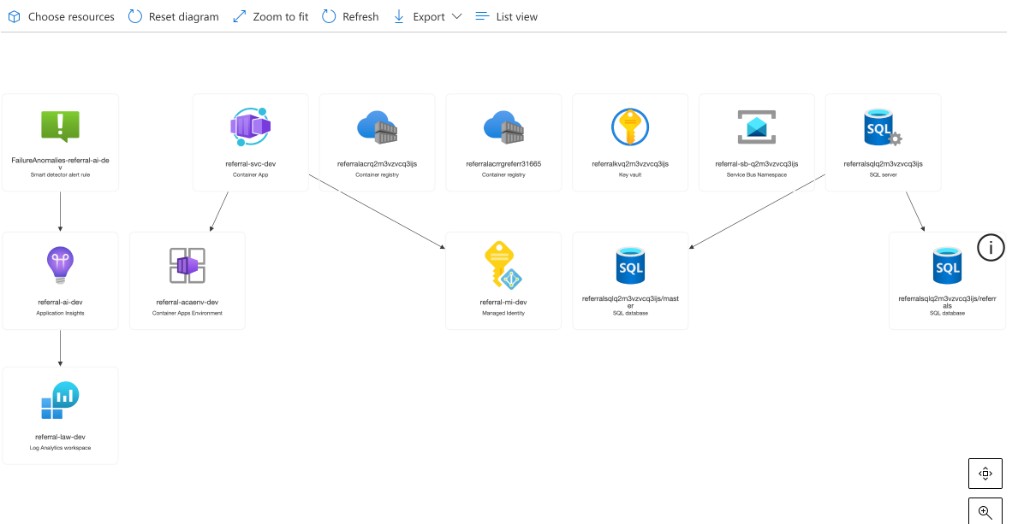
referral-svc-dev in referral-acaenv-dev · .NET 10 containerreferrals · MI auth (no SQL password in app)See slides: Revisions · Blue/Green · Where is DAPR?docs/ACA-vs-AKS.mdinfra/main.bicep
Where to go next
npx bmad-method install --modules bmm --tools cursor,claude-code,github-copilotNavigate: ← → · Fullscreen F · Overview grid O · Private notes popup S · Theme T